
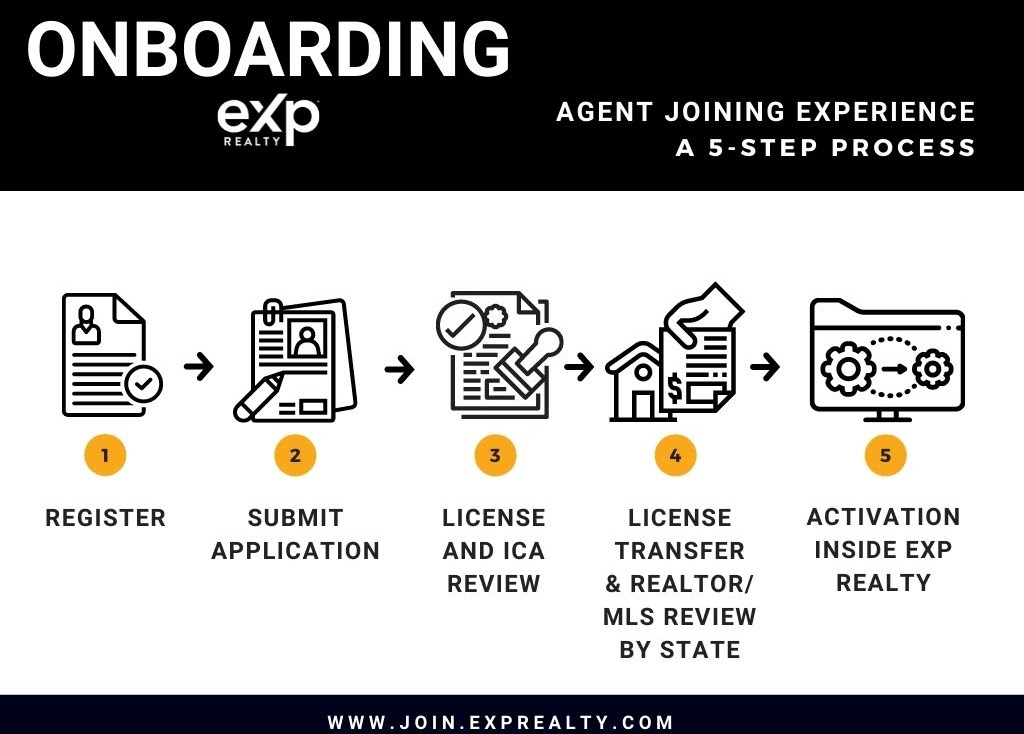
Step 1 and 2- Register/ Submit Application
***If you are wanting to transfer your team or brokerage to eXp Realty please reach out to us prior to signing up, so we can make sure the process is done correctly and efficiently.***
- MAKE SURE TO INPUT CORRECT SPONSOR AS THIS STEP CANNOT BE UNDONE (Click HERE For Sponsor FAQ)
Submit Application and Independent Contractors Agreement HERE–>(https://join.exprealty.com/).
- Common Questions During Application:
- Agent Equity Program – Contribute 5% of sale to your stock account at a 10% discount in price. You may sell at any time (no vesting)
- Common Questions During Application:
Step 3- LICENSE AND ICA REVIEW
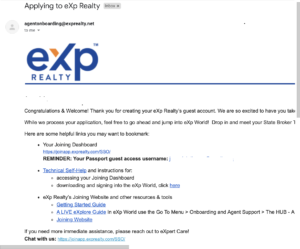
Receive confirmation email. Contains Personal Code for Onboarding Tracker Site (Subject: Your eXp Realty Join Request Has Been Received)
- During this step eXp will be in touch quickly if any of your payments had an error or documents need further attention
Log in to https://joinapp.exprealty.com/SSO/
Receive an email with your log in credentials for Guest Pass as shown above. (Subject: ACTIVATION – eXp World Guest Pass)
ICA will the be signed off on by eXp’s Internal Team
You will receive an email with completed ICA (Subject: Copy of your Independent Contractor Agreement)
Step 4- License Transfor/ Realtor MLS Review
- You will likely be contacted by eXpert Care Conciege via text or email. Feel free to reply back and ask them any questions you may have and for a document to show you how to transfer your license on the state’s eLicensing platform
- The steps will also be listed below
- Go to your state’s eLicensing system. In California, the URL is https://secure.dre.ca.gov/elicensing/. If you have an account then login, otherwise register an account. Once you are logged in proceed to “change/add responsible broker”. When asked to furnish the eXp Realty licensing number refer to the table below. Also refer to the table when asked for broker address.
- You will then be asked if your broker is available to confirm your license. Answer “No”
- When asked furnish the broker’s email address. The address is as follows—> ca.broker@exprealty.net
- If need be, while you are in the eLicensing section change your mailing address to your home mailing address
Broker License Number: 01878277 Name: eXp Realty of California, Inc. Address: 2603 CAMINO RAMON, SUITE 200
SAN RAMON, CA 94583
- Broker Team will review and accept the transfer after you complete these steps on eLicensing
- The Broker team may take UP TO 48 hours. This entire process varies but can be completed in as little as same day or early next day from your eLicensing request.
- If you are dying to have the transfer done as quick as possible and want to accelerate this process. Log into eXp World using your guest pass and go to the state broker’s office. Introduce yourself and ask if they have received your eLicensing request and if they may need any more information. If they do not complete it on the spot go in the next day and ask if you can get an update on the status of your request.
Step 5- ACTIVATION INSIDE EXP REALTY!
eXp Passport
Set up your new eXp email – this step must be completed to onboard (Subject: Activate Your eXp Realty Email Address)
Active and Ready to Start
- Register for the 1026 Club after you input a sponsor from the club and finish your eXp application. The 1026 Club will approve your membership if you have completed your sign-up correctly. 1026 Club Benefits are only for agents sponsored by one of our members.
Once our team makes you active in the system you will receive a couple of emails
Welcome Email (Subject: Welcome to eXp Realty! Your Passport Account)
Skyslope Email (Subject: Activate Your eXp Realty SkySlope Account)
Ways to Contact eXp Staff
General onboarding questions – agentonboarding@exprealty.net
Eastern specific onboarding questions – easterncareers@exprealty.net
Central specific onboarding questions – centralcareers@exprealty.net
Western specific onboarding questions – westerncareers@exprealty.net
Individual agent questions after onboarding – agentservices@exprealty.net
General team onboarding questions – teamservices@exprealty.com
Eastern specific onboarding questions – teamonboarding.east@exprealty.net
Central specific onboarding questions – teamonboarding.central@exprealty.net
Western specific onboarding questions – teamonboarding.west@exprealty.net
Team questions after onboarding – teamagentservices@exprealty.net
JoinApp: How do Agents find their Personal Code?
The Personal Code lets an agent retrieve their current onboarding status.
It is available to them on their Join App dashboard.
Once they login to JoinApp at joinapp.exprealty.com/SSO/
They will see something like this and they will be able to copy/paste the Personal Code number into the blank, then hit “Retrieve” to display their current Onboarding Status.
Activating Your eXp Passport Account
- Locate the eXp Passport activation email in your inbox. NOTE: The subject will be “Welcome to eXp Passport!” or “ACTION REQUIRED: eXp Passport Account Activation“
- Click “Activate you eXp Passport Account” link in the email
- Set your password, security question and answer, and select a security image
- Click “Configure factor” to setup multifactor authentication
- Enter your mobile phone number and click “Send code”
- A text message containing a 6 digit code will be sent to your mobile phone
- Enter the code you received and click “Verify”
- Finished
Can’t find your activation email?
NOTE: In order for the activation email to be resent, the request must come from your @exprealty.com email address.